How to Hide Followers on Instagram in 2026
Instagram Follower Privacy in 2026
Want to know how to hide followers on Instagram without wrecking your account visibility? I reviewed current Meta/Instagram privacy mechanics and 2026 digital usage data to map what’s possible, what’s not, and the safest alternatives.
If you’re wondering how to hide followers on Instagram in 2026, the main option is to use Instagram’s privacy settings and switch your account from Public to Private. This lets you control who can view your followers and following lists while still allowing you to post, interact, and use Instagram normally.
Instagram still does not have a universal “hide followers/following” toggle. The most reliable way to hide your followers list from strangers is to make your account Private. Once your account is private, only people you approve as followers can see your followers and following lists.
If you want to hide your followers from a specific person, you generally need to remove or block that person. Features such as Restrict, Close Friends, and Hide Story From can limit interactions or prevent someone from seeing certain content, but they do not hide your followers or following list.
Does Instagram Let You Hide Your Followers in 2026?
No, not completely. However, you can hide your followers and following lists from non-followers by switching your account to private.
Here are the Instagram terms people often confuse:
- Followers list: The people who follow your account
- Following list: The people you follow
- Follower count: The total number displayed on your profile header
The rule is still straightforward:
- Public account: Your followers and following lists can be viewed by others
- Private account: Your followers and following lists are only visible to followers you approve
- Specific approved follower: Instagram does not provide a setting that lets you hide your followers list from just one approved follower
What You Can Do Instead:
- Switch to Private to hide your followers and following lists from non-followers
- Remove someone if you want to prevent a particular person from following you, especially when your account is private
- Block someone to stop them from viewing your profile and follower information, whether your account is public or private
Table of Contents
3 Common Myths About Hiding Instagram Followers
Myth 1: Restricting Someone Hides Your Followers
The Restrict feature changes how a person can interact with your account, but it does not hide your followers or following lists from them.
Myth 2: Close Friends Can Hide Your Followers
Close Friends only controls who can view your Stories. It does not change the visibility of your followers or following lists on your profile.
Myth 3: Third-Party Apps Can Hide Your Followers
Third-party apps cannot change Instagram’s rules for follower-list visibility. Many of these apps can also be phishing traps designed to steal your Instagram login details.
Who Can See Your Followers on Instagram?
Your Instagram follower list is not equally visible to everyone. Whether people can see it mainly depends on whether your account is public or private, as well as what action you have taken with a particular user.
Who is viewing? | Public account | Private account |
Someone who doesn’t follow you | Can view your followers and following lists | Cannot view your posts or complete lists |
Someone you approved | Can view your followers and following lists | Can view your posts and lists |
Someone you removed | Can still view your lists if your account is public | No longer has access to your posts or lists |
Someone you blocked | Cannot normally open or access your profile | Cannot normally open or access your profile |
Someone you restricted | Can see information available to other viewers | Can still see your lists if they remain an approved follower |
Quick Answers About Instagram Follower Privacy
Can people who don’t follow me see my followers and following?
Yes, when your account is public. If your account is private, non-followers cannot access your full followers or following lists.
Who can see my followers when my account is private?
Only followers whose requests you have accepted can see your follower and following lists.
Can someone discover my followers through mutual connections?
Instagram may display things such as “Followed by” suggestions or shared connections. However, seeing these hints does not mean someone automatically has access to your complete follower list. That depends on your account’s privacy status.
What Happens When You Make Your Instagram Account Private?
Think of a private Instagram account as a filter between your profile and the public. Going private does not make every part of your profile disappear. Your username, profile picture, bio, and certain profile counts may still be visible, depending on how Instagram currently displays them.
The important privacy change is that your posts, followers list, and following list are limited to people you approve.
Block, Restrict, Mute, or Remove: What’s the Difference?
Instagram offers several ways to control another person’s access, but each one serves a different purpose:
- Block: The strongest option when you want to stop someone from accessing or contacting you through your profile.
- Restrict: A softer approach that limits interactions without completely cutting the person off. Their comments can require approval, while some activity information is also limited.
- Mute: This affects what you see. It removes someone’s posts or Stories from your feed but does not prevent them from viewing your profile.
- Remove follower: Removes a person from your followers without sending them a removal notification. This is particularly useful for private accounts when you no longer want someone to have access to your content or lists.
Remember: Restricting someone changes how they interact with you; it does not hide your followers list from them.
How to Hide Your Followers on Instagram on iPhone or Android
If you’re trying to hide your Instagram followers from people who don’t follow you, the simplest built-in solution is to make your account private. Instagram does not provide a separate switch specifically for hiding your follower list.
Go to:
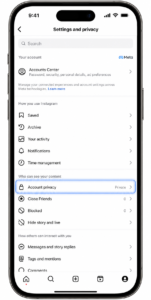
Profile → Menu (≡) → Settings and privacy → Account privacy → Private account → Turn it on
What Changes After You Go Private?
Once your account becomes private:
- People who don’t follow you can no longer view your posts or complete followers/following lists.
- Anyone who wants to access your content will need to send you a follow request first.
What About Your Existing Followers?
Making your account private does not automatically remove people who already follow you.
- Your approved followers can still see your posts and followers/following lists.
- Anyone you have already accepted will keep that access unless you manually remove or block them.
A Few Things to Check Before Going Private
If privacy is your main goal, take a moment to review other parts of your account too:
- Check old tagged photos and mentions you may no longer want associated with your profile.
- Review who can reply to your Stories and send you message requests.
- Enable Hidden Words if unwanted or spam comments are a regular problem.
How to Make Your Instagram Account Private on iPhone
Follow these steps to hide your Instagram followers and following lists from people who don’t follow you:
- Open Instagram and tap your Profile icon in the bottom-right corner.
- Select the Menu (≡) button in the top-right corner.
- Open Settings and privacy.
- Scroll to Account privacy and tap it.
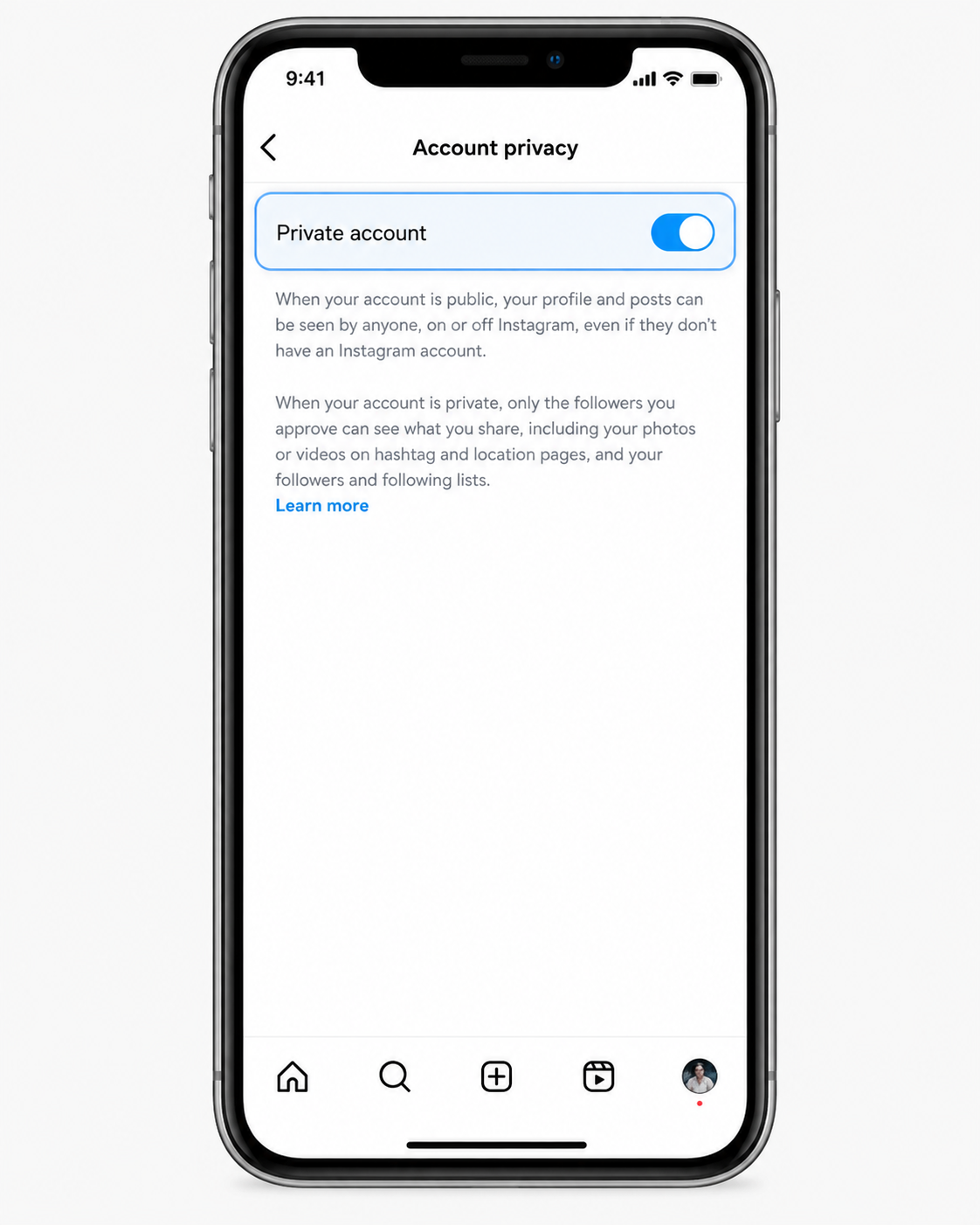
- Turn on the Private account option.
Once your account is private, people who aren’t following you will no longer have the same access to your profile content and follower/following lists. Instead of immediately viewing your content, new users will need to send you a Follow request and wait for your approval.
How to Make Instagram Private on Android
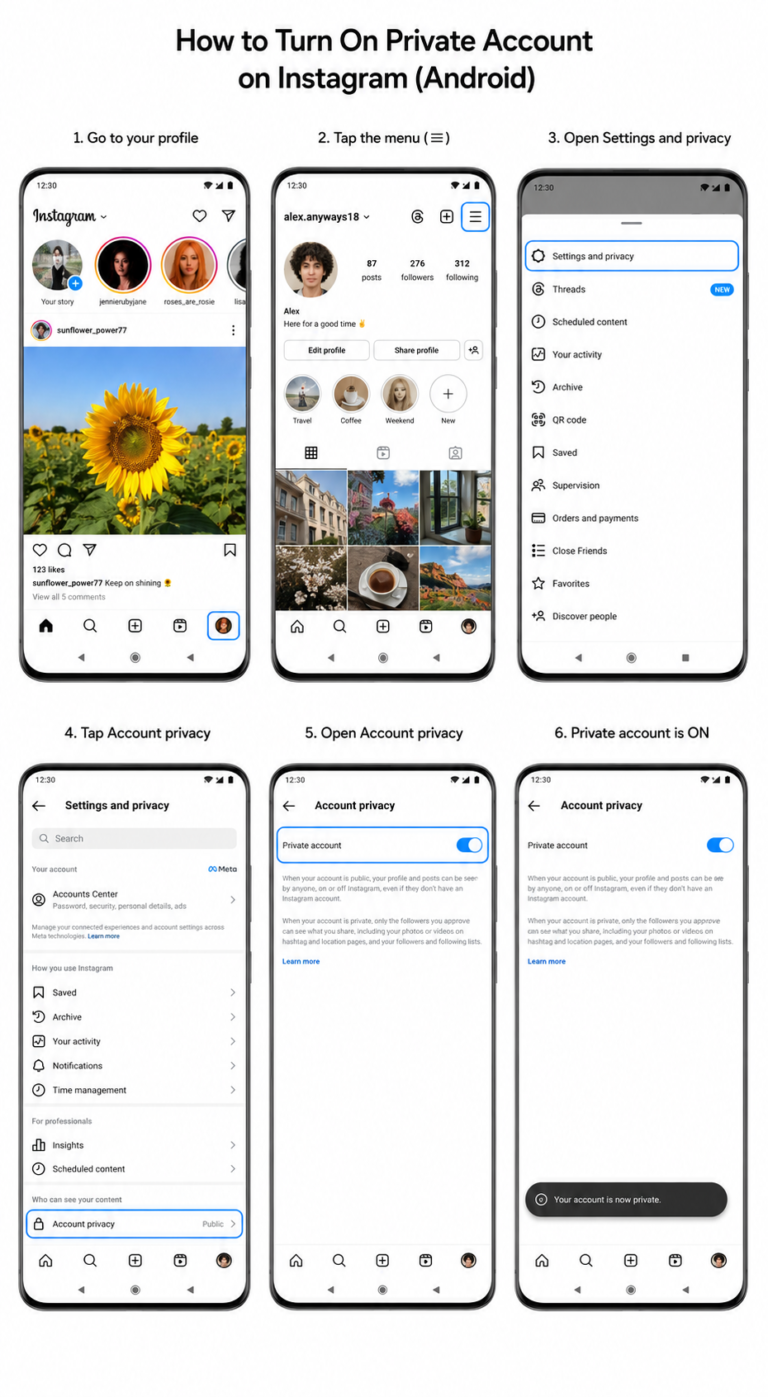
The Android version of Instagram works almost the same way, although the exact menu names or placement may vary slightly depending on your app version.
- Open your profile and tap the Menu (≡) icon.
- Go to Settings and privacy, then select Account privacy.
- Switch Private account on.
Can’t find Account privacy? Use the search option within Instagram’s Settings and search for privacy to locate the setting faster.
Review Your Followers After Going Private
Making your account private is only the first step. If there are existing followers you no longer want to have access to your content or Instagram followers list, you should remove them manually.
- Open your Profile.
- Tap Followers.
- Find the person you want to remove and tap Remove.
Instagram does not send a notification when you remove a follower.
This step also explains why someone may still be able to see your followers and following lists even after you switch to a private account. If you already approved that person as a follower, they can continue to access your lists until you remove or block them.
Hiding Instagram Followers From the Web or Desktop
You can also change your Instagram privacy settings from a computer, which can be more convenient when you’re managing your account with a larger screen.
Go to Instagram.com → Profile → Settings → Account privacy, then turn on Private account.
Web vs. App: Which Is Better?
Desktop: Helpful for reviewing and cleaning your followers list when you want a bigger, less cluttered screen.
Instagram app: Better for everyday privacy management, including features such as Limits and comment controls.
Instagram Desktop Privacy Troubleshooting
Having trouble finding the Private account setting on Instagram’s desktop version? Try these quick fixes:
- Make sure you’re signed into the right Instagram account in your browser.
- Refresh the page completely, or sign out and sign back in.
- If parts of the Settings menu are not loading, clear Instagram’s cookies and try again.
- If you manage more than one Meta profile, check Accounts Center. Some privacy options may appear there for connected accounts.
Can You Hide Your Followers From Just One Person?
Instagram does not offer a setting that lets you hide your followers list from one specific person while keeping them as an approved follower.
Your practical choices are to change their access or change your account’s overall visibility:
- Private account: Remove the person from your followers. They will no longer have access, although they can send another Follow request.
- Public account: Removing them is not enough because anyone can still view your public profile and lists. If you need to completely stop their access, blocking is the more reliable option.
Meta’s Help Center also connects the Remove follower feature with private Instagram accounts.
Remove, Block, or Restrict: Which Should You Use?
The right option depends on what you are trying to accomplish.
Someone you used to date keeps checking your connections:
Switch your account to private and remove them. If they continue attempting to access your profile, block them.
A coworker is browsing your personal network:
Go private, remove them from your followers, and consider tightening your mentions and Story audience settings as well.
A spam or harassment account is targeting you:
Block the account immediately. If you’re dealing with a sudden wave of unwanted accounts, Instagram’s Limits feature can also reduce interactions from recent or non-followers for up to four weeks.
Instagram does not send a notification telling someone that you removed them. However, they may notice later if they can no longer access your content or suddenly see the Follow button again.
Restrict is also a quiet setting, but it should not be confused with hiding followers. Restrict changes how someone can interact with you; it does not remove their ability to view your follower lists when they still have profile access.
Why Someone Can Still See Your Followers After You Go Private
If you’ve already switched to a private account but someone can still see your followers, work through this checklist:
- Is your account actually private?
If your profile is still public, your lists remain accessible.
Fix: Turn on Private account. - Is the person already an approved follower?
Private accounts still allow approved followers to see their followers and following lists.
Fix: Remove that person from your followers. - Are you using Restrict instead of Block?
Restrict limits interactions but doesn’t create a wall around your profile.
Fix: Use Block when you need to prevent profile access. - Could the Instagram app be outdated or temporarily glitching?
Update Instagram, then log out and sign back in. - Are lists appearing incomplete or showing “No users found”?
Temporary loading problems or platform limits can sometimes cause partial results. Wait a while and check again, preferably from Instagram’s web version.